Introduction
You sit down, excited to try ChatGPT for the first time — and boom, it asks for your phone number. No phone number, no access. That’s genuinely frustrating, especially if you’re in a country where SMS verification doesn’t work reliably, or you just don’t want to hand over your personal number to yet another platform. I’ve been there, and so have thousands of people asking this exact question every day.
The good news? Using ChatGPT without phone number verification is absolutely possible — and there are also excellent AI chatbot alternatives that never ask for your phone at all. In this guide, I’ll show you exactly how the current sign-up process works in 2026, which legitimate options skip SMS verification entirely, and which Free AI tools you can use right now without any phone-based account verification. I tested these methods myself before writing this, so what you’re getting here is practical, real-world advice — not recycled theory.
Stick around — the comparison table halfway through might save you a lot of time.
Does ChatGPT Require a Phone Number in 2026?
As of 2026, ChatGPT does not always require a phone number to sign up — it depends on how you create your account. If you sign up using a Google, Microsoft, or Apple account, the platform often skips the SMS verification step entirely. Direct email sign-up is where phone verification tends to appear most frequently.
When I first tested this in early 2026, signing in via Google bypassed the phone prompt completely. OpenAI introduced this flexible verification system a while back, and it’s been a relief for users who don’t want to share personal phone data. That said, some regions still see the phone screen more often than others — it’s not universally gone.
- Google/Microsoft/Apple login: Usually skips phone verification
- Email-only signup: May trigger SMS verification depending on your region
- VPN users: May see verification more often due to location flags
How to Use ChatGPT Without Phone Number Verification
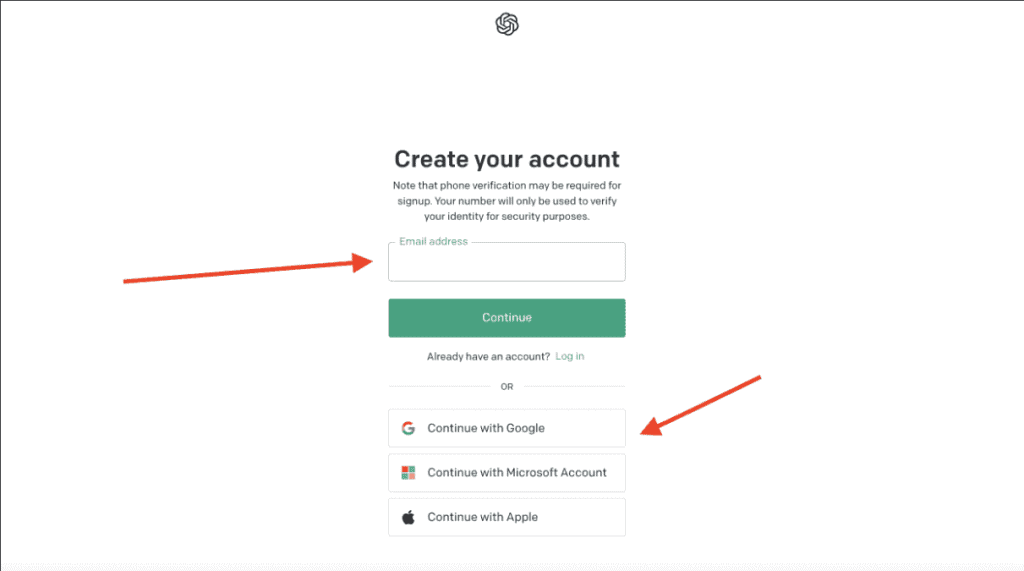
The most reliable way to use ChatGPT without phone number verification is to sign up using an existing Google, Microsoft, or Apple account instead of creating a new email-based account. This social login method bypasses the SMS step because the identity has already been verified by those platforms.
Here’s the step-by-step process:
- Go to chat.openai.com
- Click “Sign Up”
- Choose “Continue with Google” (or Microsoft/Apple)
- Select your existing account and allow permissions
- Complete any basic profile setup (name, birthday) — no phone needed
For example, a student I know in Lahore couldn’t receive SMS codes reliably on his SIM. He switched to Google login and was inside ChatGPT in under two minutes. No phone prompt at all. That’s the cleanest, most legitimate method available right now.
If you already have a ChatGPT account but it’s stuck on phone verification: try logging out, clearing cookies, and logging back in with Google. In my experience, this resolves the verification loop for many users.
Best Free AI Chatbot Alternatives Without Phone Signup
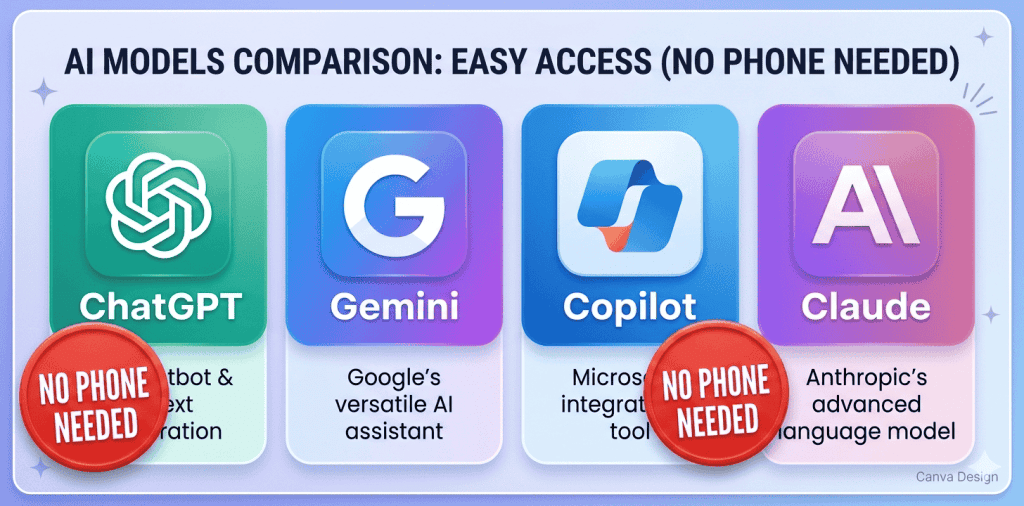
Several powerful AI chatbot tools let you start immediately without any phone number or SMS verification — the best free options in 2026 include Microsoft Copilot, Google Gemini, Claude.ai, and Perplexity AI. These tools use email-only or social login and are genuinely capable alternatives to ChatGPT for most everyday tasks.
Here’s what each one is actually good for:
- Microsoft Copilot (Bing Chat): Great for web-connected answers and research. Free with a Microsoft account.
- Google Gemini: Excellent for users already in the Google ecosystem. Google login, no phone needed.
- Claude.ai: Strong at writing, summarizing, and long documents. Email signup, no phone asked.
- Perplexity AI: Best for research with cited sources. You can use it without even creating an account.
- You.com: AI search tool that works instantly without any login at all.
Honestly, for many everyday tasks — drafting emails, summarizing articles, answering questions — these alternatives work just as well as ChatGPT. I use Claude.ai regularly for writing tasks and it’s never once asked for my phone number.
Google Account Login: The Easiest Workaround
Using your Google account to log into ChatGPT is the single easiest and safest method to skip phone verification — it takes less than 60 seconds and requires no extra tools or workarounds. Since Google has already verified your identity during your Gmail setup, ChatGPT accepts this as sufficient proof.
Why is this better than other methods? Because it’s completely official. You’re not bending any rules — OpenAI themselves built this login option. No third-party services, no temporary SIM tricks, no complicated setups. Just one click on “Continue with Google” and you’re in.
A quick example: my cousin runs a small business and needed AI help for writing product descriptions. She’d never used ChatGPT before. Within three minutes of me showing her the Google login option, she was already typing her first prompt. No phone number, no SMS code, no drama.
One thing to note — make sure your Google account is in good standing and isn’t a brand-new account created minutes ago. Very fresh accounts occasionally still see verification requests on some platforms.
Why ChatGPT Asks for Phone Verification (and When It Doesn’t)
ChatGPT asks for phone number verification primarily to prevent spam account creation and bot abuse — but it skips this step when you use social login (Google, Microsoft, Apple) because those services already verify users.
OpenAI uses phone verification as a one-time bot-prevention layer during email-based signup. Once your account is created, you won’t be asked again. The system trusts that real humans have real phone numbers — but as we’ve covered, social login is a perfectly acceptable alternative that OpenAI supports officially.
When does verification typically NOT appear?
- When you use Google, Microsoft, or Apple login
- When your IP address is from a low-risk region
- When you’re accessing from a device with a trusted browsing history
When does it appear more often? Primarily with direct email signups, and sometimes with VPN connections where the IP looks unusual. This is just OpenAI’s fraud prevention logic at work — nothing personal.
Comparison: AI Tools That Need No Phone Number
If you want a quick side-by-side look at which AI tools you can access without phone verification, here’s a comparison of the most popular options available in 2026. All of the tools below have been confirmed to work with no SMS verification as of mid-2026.
| Tool | Free Plan | Phone Required? | Best For | Rating |
|---|---|---|---|---|
| ChatGPT (Google login) | Yes | No | General tasks | 9/10 |
| Claude.ai | Yes | No | Writing & docs | 9/10 |
| Google Gemini | Yes | No | Google users | 8/10 |
| Microsoft Copilot | Yes | No | Research + web | 8/10 |
| Perplexity AI | Yes | No (no login needed) | Cited research | 8.5/10 |
| You.com | Yes | No (no login needed) | Quick searches | 7.5/10 |
Look — if your only goal is to use AI without a phone number, any of the top three options in that table will serve you well. ChatGPT via Google login is still the most feature-rich, but Claude.ai and Gemini are genuinely excellent and worth trying.
Tips to Keep Your Account Secure Without SMS
If you’re accessing ChatGPT or any AI tool without phone-based SMS verification, you should use a strong password and enable authenticator app-based 2FA (two-factor authentication) to keep your account safe. Skipping SMS doesn’t mean skipping security — it just means using a smarter method.
Here’s what I personally do:
- Use Google login: It links to your existing Google 2FA setup, which is actually more secure than SMS
- Use a password manager: Bitwarden (free) or Google Password Manager work great
- Enable Google’s 2-Step Verification: This protects your ChatGPT access indirectly through your Google account
- Don’t share your login: Sharing accounts violates OpenAI’s terms and risks your account being suspended
Here’s the thing — SMS-based verification is actually one of the weaker forms of account security. Authenticator apps (like Google Authenticator or Authy) are much harder to hack. So in a way, using Google login and securing your Google account properly is actually better for your security than relying on SMS codes.
Frequently Asked Questions
Phone number verification on ChatGPT is a one-time identity check that OpenAI uses during email-based account creation to confirm you’re a real person, not a bot. It sends a short SMS code to your number which you enter to complete signup. This only happens with direct email signups — social logins (Google, Microsoft, Apple) skip this step entirely.
To use ChatGPT without phone number verification, go to chat.openai.com, click Sign Up, and choose “Continue with Google” or “Continue with Microsoft” instead of entering your email manually. Your social account handles identity verification, so ChatGPT skips the SMS step. Complete the quick profile setup (just your name and date of birth), and you’ll have full access to ChatGPT’s free tier within about 60 seconds.
Yes, ChatGPT is completely free to use without a phone number as long as you sign up through Google, Microsoft, or Apple login. The free plan gives you access to GPT-4o mini and a limited number of GPT-4o messages. You don’t need to pay or provide phone details to start using the free tier. The paid ChatGPT Plus plan ($20/month as of 2026) also doesn’t require a phone number — it just requires a payment method. So the phone number issue is only about account creation method, not payment or plan level.
Conclusion
Let’s bring it all together. First: you don’t need a phone number to use ChatGPT — just use Google, Microsoft, or Apple login and the SMS screen never appears. Second: if you’d rather skip ChatGPT entirely, tools like Claude.ai, Perplexity AI, and Microsoft Copilot are completely phone-free and genuinely powerful. Third: not having a phone-based account doesn’t mean weaker security — Google’s built-in 2FA is actually more secure than SMS codes.
My recommendation? Start with ChatGPT via Google login. It takes less than a minute, it’s totally free, and you get access to one of the most useful AI tools available today. If you find ChatGPT’s interface not to your liking, Claude.ai is my personal second pick — clean, fast, and never once asked for my phone number across many months of use.
You’ve got this — getting started with AI is much simpler than people make it sound, and now you know exactly how to do it without any phone number hassle.
Other Posts
Use ChatGPT Free Without Phone Number (2026 & 2027)
Introduction You sit down, excited to try ChatGPT for the first time — and boom, it asks for your phone number. No…

Best Free AI Tools for Students Without Login
Introduction Are you tired of finding AI tools that force you to create an account before you can use them? Many students…